Daily Bath Chemistry Logging
On this page
- Why we log chemistry
- Step 1: Open the Bath Logs list
- Step 2: Start a new log
- Step 3: Pick the bath (box ①)
- Step 4: Timing + operator (box ②)
- Step 5: Enter each reading (boxes ③, ④)
- Step 6: Save + what happens next
- Step 7: Respond to a Fail
- Step 8: Out-of-shift back-fill
- What can go wrong
- "Bath" dropdown is empty
- I picked a bath and no readings showed up
- Status stays grey after I entered values
- I entered a reading but it shouldn't have been a "Fail"
- The bath turned "Out of Spec" and now production is blocked
Why we log chemistry
Every plating bath has a target chemistry. Miss the target and the result is scrap parts, customer rejects, or — worse — a nondetected out-of-spec that ships and comes back as a warranty claim. Logs are the shop's first line of defence and the auditor's first piece of evidence.
Minimum cadence:
- Every bath, start of shift.
- After any replenishment.
- After any dump / decant.
- Immediately if an operator reports a visible change (colour, foaming, heavy particulate).
Step 1: Open the Bath Logs list
Menu: Plating → Operations → Chemistry Logs.
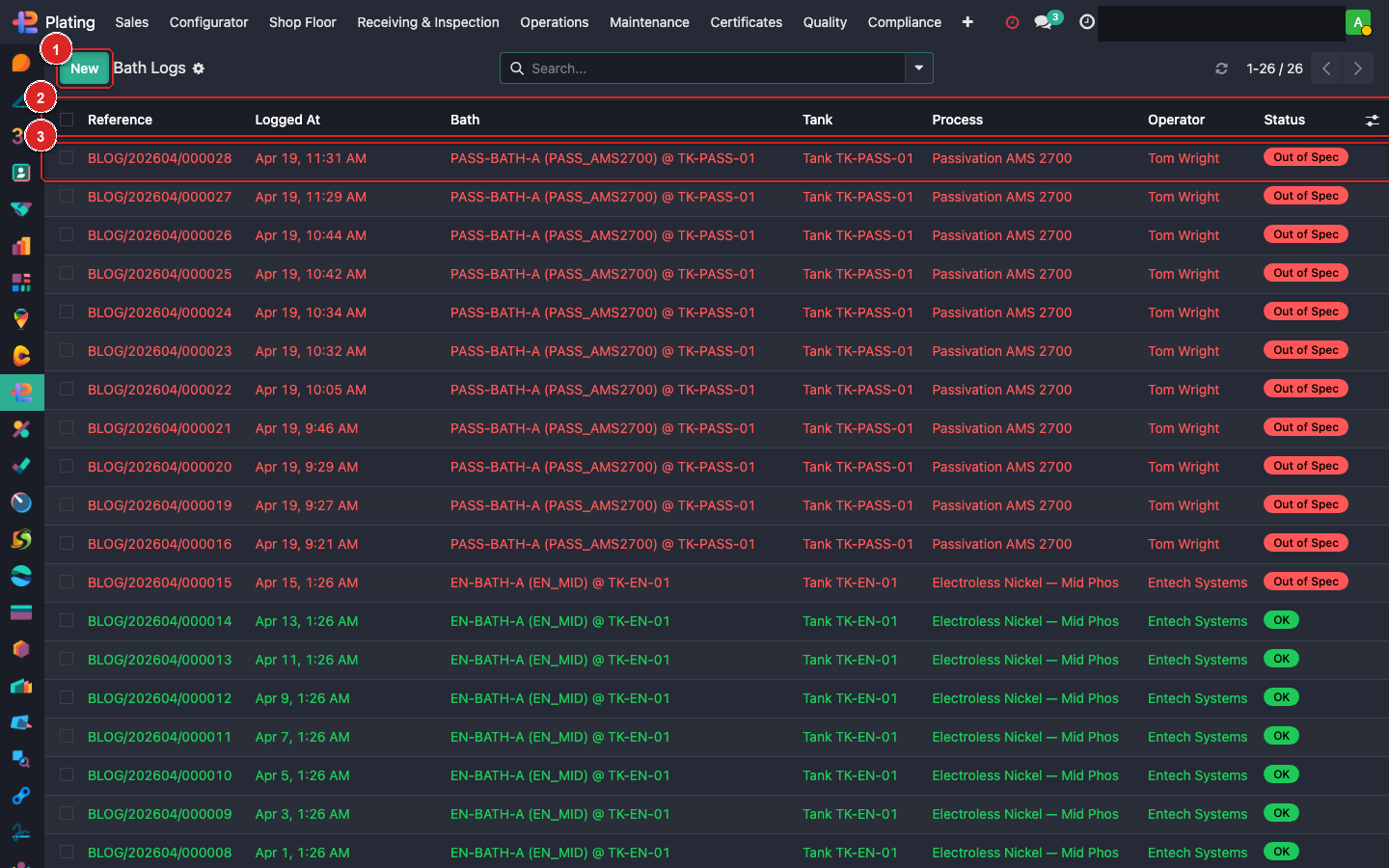
What you see:
- Box ① — + New button. Opens a blank log entry.
- Box ② — Status column for each row: green OK when all readings are in-spec; yellow Warning when close; red Fail when out-of-spec.
- Box ③ — Operator and Status. Filter by "Fail" to see all out-of-spec readings across all baths — this is the quality-morning view.
Step 2: Start a new log
Click + New. The form opens.
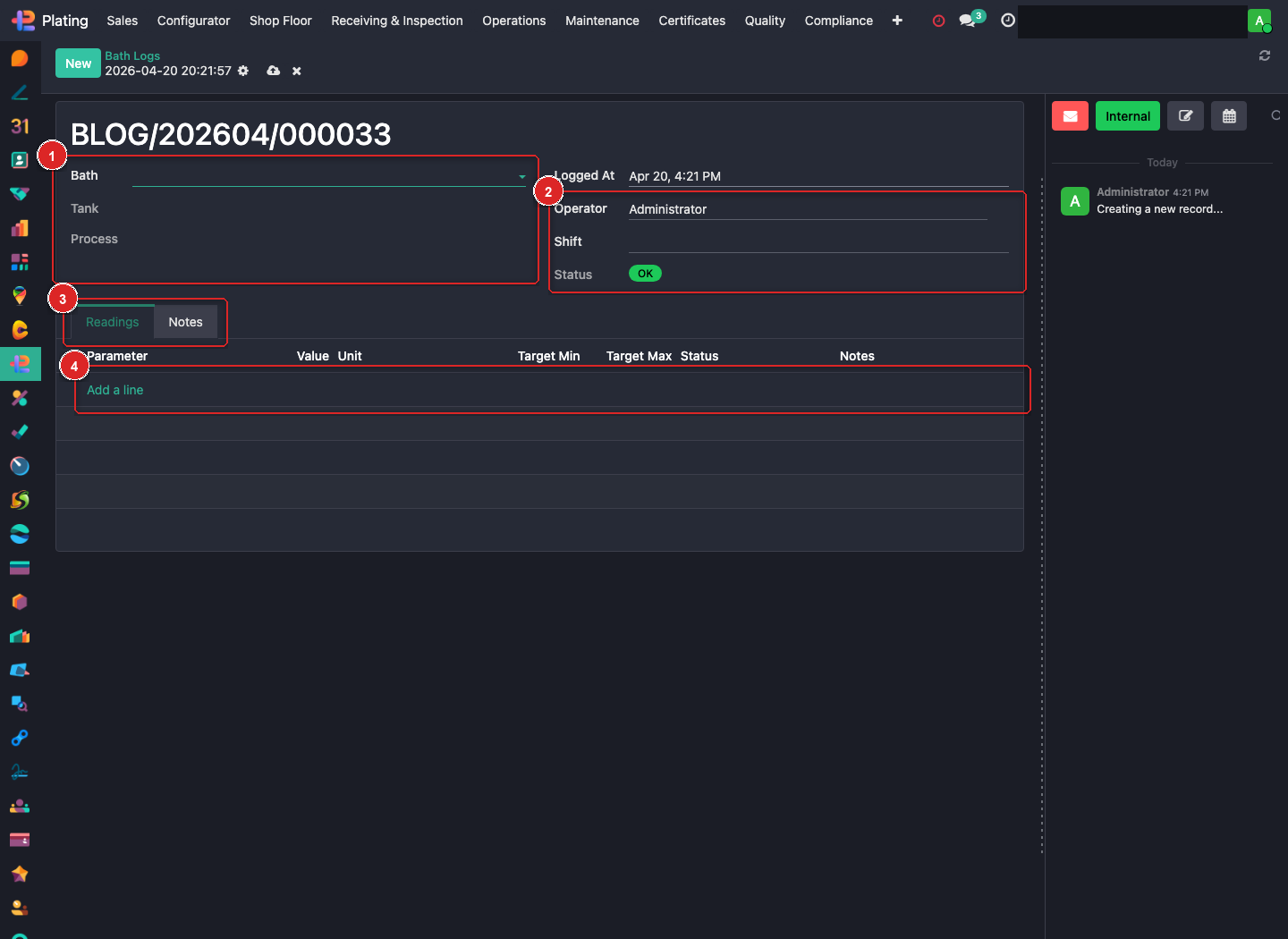
Sections to fill:
- Box ① — Bath / Tank / Process. Pick the bath; tank and process auto-fill.
- Box ② — Logged At / Operator / Shift / Status. Defaults to now + you; adjust Shift.
- Box ③ — Readings tab.
- Box ④ — Add a line — one row per parameter.
Step 3: Pick the bath (box ①)
Click Bath. The dropdown lists every active bath at your facility. Pick it.
The moment you pick a bath:
- Tank auto-fills (the physical tank holding this bath).
- Process auto-fills (the process family — EN, Chrome, Anodize, etc.).
- The Readings tab (box ④) pre-populates with one line per parameter defined for this bath — e.g. pH, Temperature, Nickel, Hypophosphite. Each row shows the Target Min and Target Max from the parameter spec.
Step 4: Timing + operator (box ②)
| Field | Default | When to change |
|---|---|---|
| Logged At | Now | Change only if you're back-entering a reading from earlier. |
| Operator | You (logged-in user) | Leave. |
| Shift | Auto from time-of-day rules | Override if you're covering someone else's shift. |
| Status | Computed | Read-only — auto-set from the readings. |
Step 5: Enter each reading (boxes ③, ④)
For every row in the Readings tab:
- Take the measurement (pH meter, titration, thermometer).
- Click the row → Value column.
- Type the number. The Unit field is already set from the parameter spec.
- Watch the Status column at the end of the row:
- Green OK — inside Target Min / Target Max.
- Yellow Warning — within 10% of a limit, heading out.
- Red Fail — outside the spec.
- Add a Note if anything unusual (e.g. "Nickel at lower bound, replenish before next shift").
Enter every parameter. Don't skip rows — a blank reading is treated as missing data and the log is flagged.
Step 6: Save + what happens next
Click Save (cloud icon at the top, next to the record title).
Behind the scenes:
- The log is written to
fusion.plating.bath.log. - Overall Status is computed from the worst row:
- Any row red → overall Fail.
- Any row yellow → overall Warning.
- All green → overall OK.
- The bath's "last logged" timestamp updates.
- If overall is Fail:
- The bath's
stateflips to Out of Spec. - Tablet Station's Baths panel (on every operator's screen) marks the bath red.
- Active work orders using this bath get flagged.
- The chemistry lead is notified by email (via FP: Chemistry Out Of Spec template).
- The bath's
- If overall is Warning: the bath stays operational but a chatter post goes to the chemistry lead so they can schedule replenishment.
Step 7: Respond to a Fail
If you logged a Fail:
- Stop using the bath immediately. Don't process more parts.
- Tell the chemistry lead in person and let the notification email flow.
- Open a Replenishment or Dump + Decant per the SOP. The replenishment record links back to this log for audit.
- Re-log after the chemistry correction — a fresh green log reopens the bath to production.
Step 8: Out-of-shift back-fill
If you forgot to log during your shift:
- Open the record as Today's date but change Logged At to the actual time you took the measurement.
- In Notes, write a one-liner: "Back-entered; reading taken at 14:30 during run."
- Save.
The audit log captures the actual keystroke time AND the retroactive logged_at so there's no confusion on audit.
What can go wrong
"Bath" dropdown is empty
Either no baths are defined at your facility, or the current user doesn't have access. Call the chemistry lead.
I picked a bath and no readings showed up
The bath has no parameters linked. Someone configured the bath skeleton without assigning which pH, temp, concentration readings apply. Fix in Plating → Configuration → Bath Parameters.
Status stays grey after I entered values
Save the record (cloud icon). Status is computed on save, not on keystroke.
I entered a reading but it shouldn't have been a "Fail"
Check the Target Min / Target Max on the spec — maybe the spec is outdated. If so, Configuration → Bath Parameters → update the spec. The log's status recomputes if you re-save.
The bath turned "Out of Spec" and now production is blocked
Correct behaviour. Run replenishment, log again with a green read, the bath reopens.