The ERP that runs an ADP business, from the therapist's call to the closed claim.
Built inside two working ADP vendors, Westin Healthcare and Mobility Specialties. Claims, therapist and rep portal, long-term care repairs, loaners, rentals, delivery and split billing share one record, so your office stops chasing files across inboxes, folders and spreadsheets.
ADP and client portions worked out on every line, then billed on separate invoices.
Therapists upload documents to their own cases in a portal instead of emailing them.
Each step checks its paperwork before the case can move on, and the evidence stays on the case.
An ADP case passes through a therapist, a sales rep, the office, purchasing, a technician and billing. The software should carry it the whole way, so no step depends on someone's memory.
Generic ERPs treat a wheelchair like any other sale. An ADP vendor needs more: the funding rules on every line, the application and its signed pages, the approval, the proof of delivery, the supplier bill and the claim file, all kept with the case for the day ADP asks.
We built that on Odoo for Westin Healthcare and Mobility Specialties, and we implement the same modules for other Ontario ADP vendors, configured to how each business runs.
1
One case file from first call to closed claim
The meeting, assessment, quotation, application, approval, purchase order, delivery, invoices and claim file all link to one ADP case, with an order trail showing what is in place.
2
Every role gets its own door
Therapists and sales reps work in a portal. Technicians work from their tasks. LTC staff use a repair form. The office sees all of it in Odoo.
3
The rules live in the software
A case cannot be marked ready for submission while a required reference is missing, and an ADP invoice waits for proof of delivery and supplier evidence. New staff follow the same checks as your most experienced person.
What ADP vendors deal with
Where an ADP case loses days, money and audits.
Ten problems ADP vendors run into, in the order a case meets them. Each one is paired with what the system does about it. Where the software cannot fix the cause, it keeps the problem visible on the case.
1
The problem
The therapist gets the client details late
The assessment happens, but the client information reaches the occupational therapist days later, by email or phone, and the clock on the application has not even started.
What the system does
Completing the assessment distributes its documents to the authorizer, the sales rep and your internal records, and the case appears in the therapist's own portal with the client, devices and status.
Authorizer & Sales Portal
2
The problem
The application comes back late, or not at all
Once the therapist has the case, the application waits: they forget, or they are missing something they need. That adds days, sometimes weeks.
What the system does
The case sits in Waiting for Application where everyone can see it. Reminders go to the therapist 4 and 8 days after the assessment by default, copying the rep and office, and the therapist uploads the application to that case in the portal. The funding forms library is in the portal too.
Fusion Claims and Portal
3
The problem
Mistakes slip through to ADP
An application with a missing reference or the wrong file is easy to miss on a busy day. ADP sends it back, and the client often waits another week or two.
What the system does
Ready for Submission checks the authorization date, client references, reason, previous-funding date, original application and signed pages. Stage 1 of the two-stage verification records the device types submitted and refuses a submission without the final PDF and an .xml data file. It catches gaps in your file; ADP still makes its own review.
Fusion Claims
4
The problem
What was approved is not what gets ordered
The approval says one thing, the order says another, and an item ADP did not fund goes out the door without anyone billing the client for it.
What the system does
Stage 2, Device Approval Verification, records exactly which devices ADP approved. Anything not approved moves to the client portion automatically, so giving an item away becomes a deliberate change someone makes, not an oversight.
Fusion Claims
5
The problem
Purchase orders drift away from the case
Special orders are placed from email, and months later nobody can say which purchase order bought which client's chair.
What the system does
Create PO builds purchase orders from the case lines, grouped by vendor and marked for the client, and links each one back to the case. Adding a purchase order to the case starts the supplier-bill match.
Sale Order to Purchase Order
6
The problem
Proof of delivery goes missing
The chair is delivered, the paper proof of delivery sits in a van, and billing stalls until someone finds it.
What the system does
The technician captures a signed proof of delivery on the task, and it is kept with the case. Ready to Bill will not open without the delivery date and the signed proof as a PDF.
Fusion Tasks and Fusion Claims
7
The problem
Documents are scattered
The application, signed pages, approval letter, XML, proof of delivery and supplier invoice live in different inboxes and folders.
What the system does
Every document sits on the case. The order trail shows a checklist of what is in place, and portal uploads keep each revision with who uploaded it.
Fusion Claims
8
The problem
Billing errors, and bills missing at close
A wrong split or a missing supplier invoice is only found when the payment is short or an auditor asks.
What the system does
The claim export rechecks every line against the device-code prices and refuses to run on a mismatch. ADP cannot be billed without a supplier invoice PDF on the case unless a manager records an override with a reason, and the close-case review checks vendor bills before closing.
Fusion Claims
9
The problem
Audits mean hunting for paper
When the audit letter arrives, staff spend days rebuilding files from memory and email.
What the system does
The evidence is gathered as the case moves. Each case shows its audit status, and the audit workbench matches ADP's sample to cases, flags amount differences and builds evidence packs.
Fusion Claims
10
The problem
One person holds all of it
The ADP codes, the portions and the billing file live in one person's head and spreadsheets.
What the system does
The codes, the calculation and the billing file live in the system instead. See below.
Most ADP vendors depend on one person who knows ADP.
One person knows the device codes, builds the .txt billing file for ADP by hand, tracks the ADP and client portions and keeps the compliance paperwork. Mistakes are easy to make, and because nobody checks that person's document keeping, problems surface at the audit. When that person is away, billing stops.
In the ERP the knowledge lives in the system, so the work does not depend on one desk.
1,895ADP device codes with their ADP prices ship with Fusion Claims, and updates import from JSON or CSV.
PortionsADP and client portions are calculated on every line from the client type, the approval and any deduction.
.txt fileThe ADP billing file is built from the posted ADP invoices and checked before it is written.
VisibleManagers see each case's order trail and audit status, and every billing file sent is kept in Claim Submission Files.
Recognise these problems? Book a call and walk us through how a case moves through your office today.
Recreated on a demo company with invented clients. These are the same kinds of screens the teams at Westin Healthcare and Mobility Specialties work in. Click any screen to see it larger.
Built by Nexa SystemsSample data
1 / 7
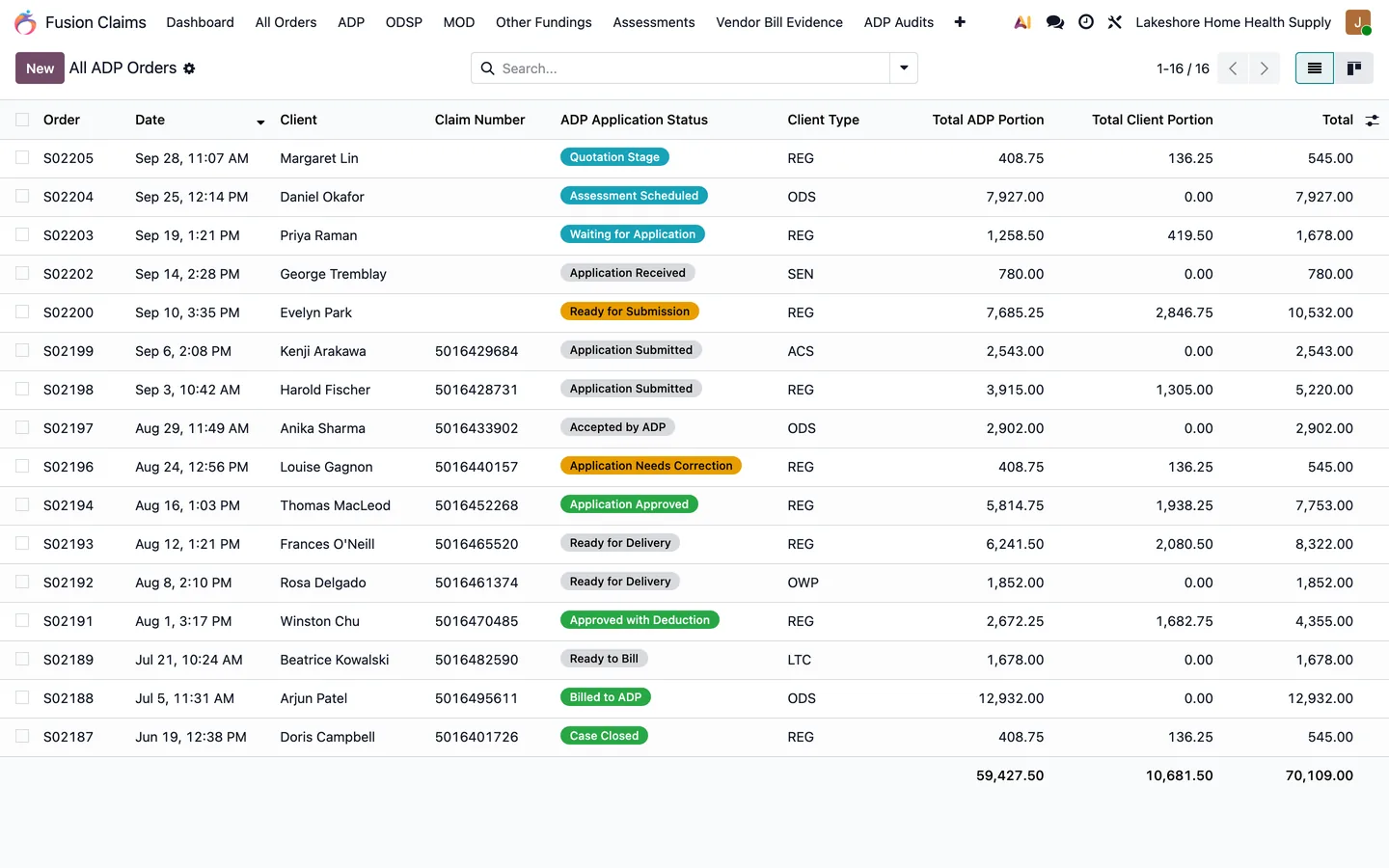
Every ADP order with its funding status, client type, claim number, and the ADP and client portions.
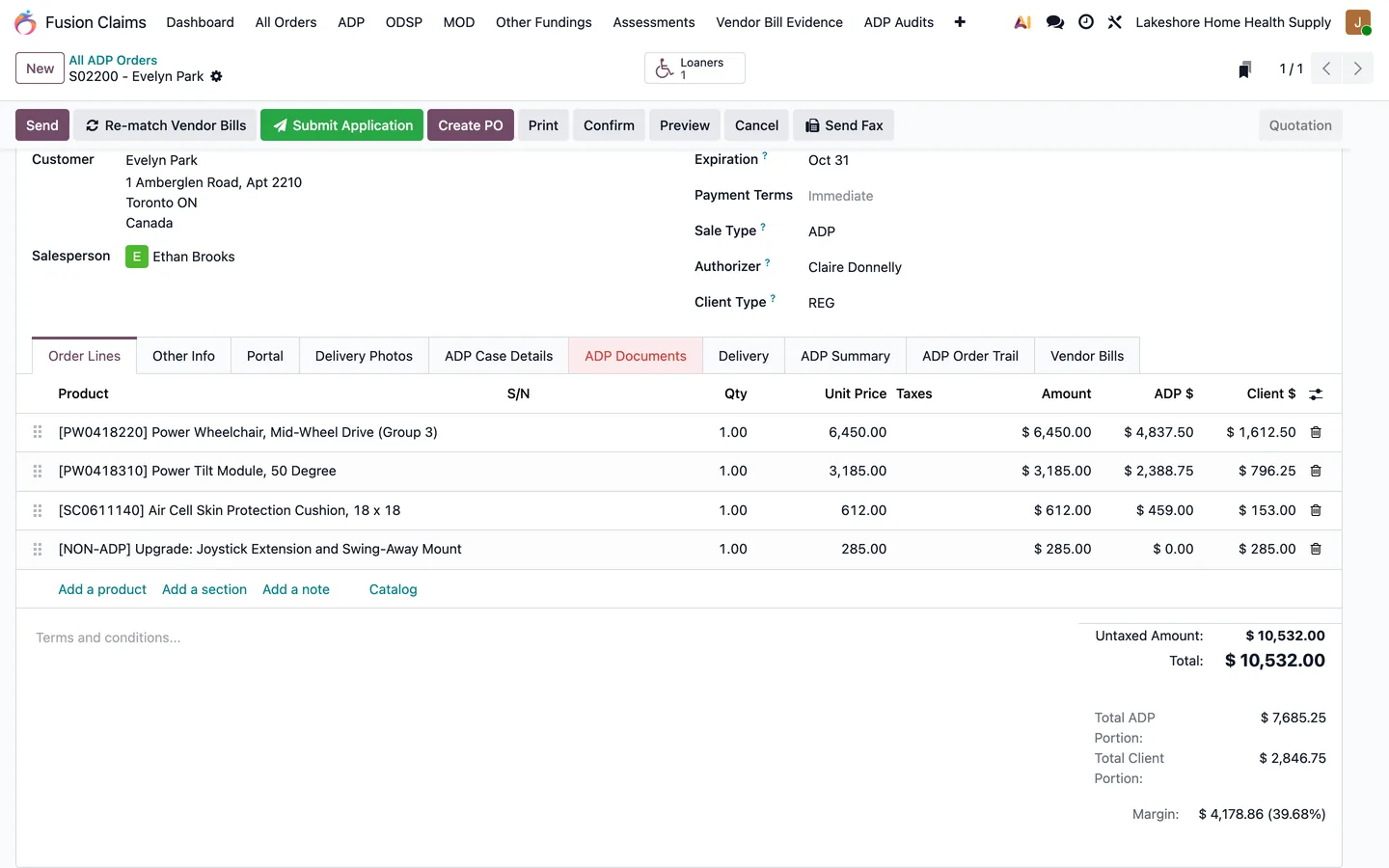
Device lines split between ADP and the client automatically; non-funded upgrades go to the client.
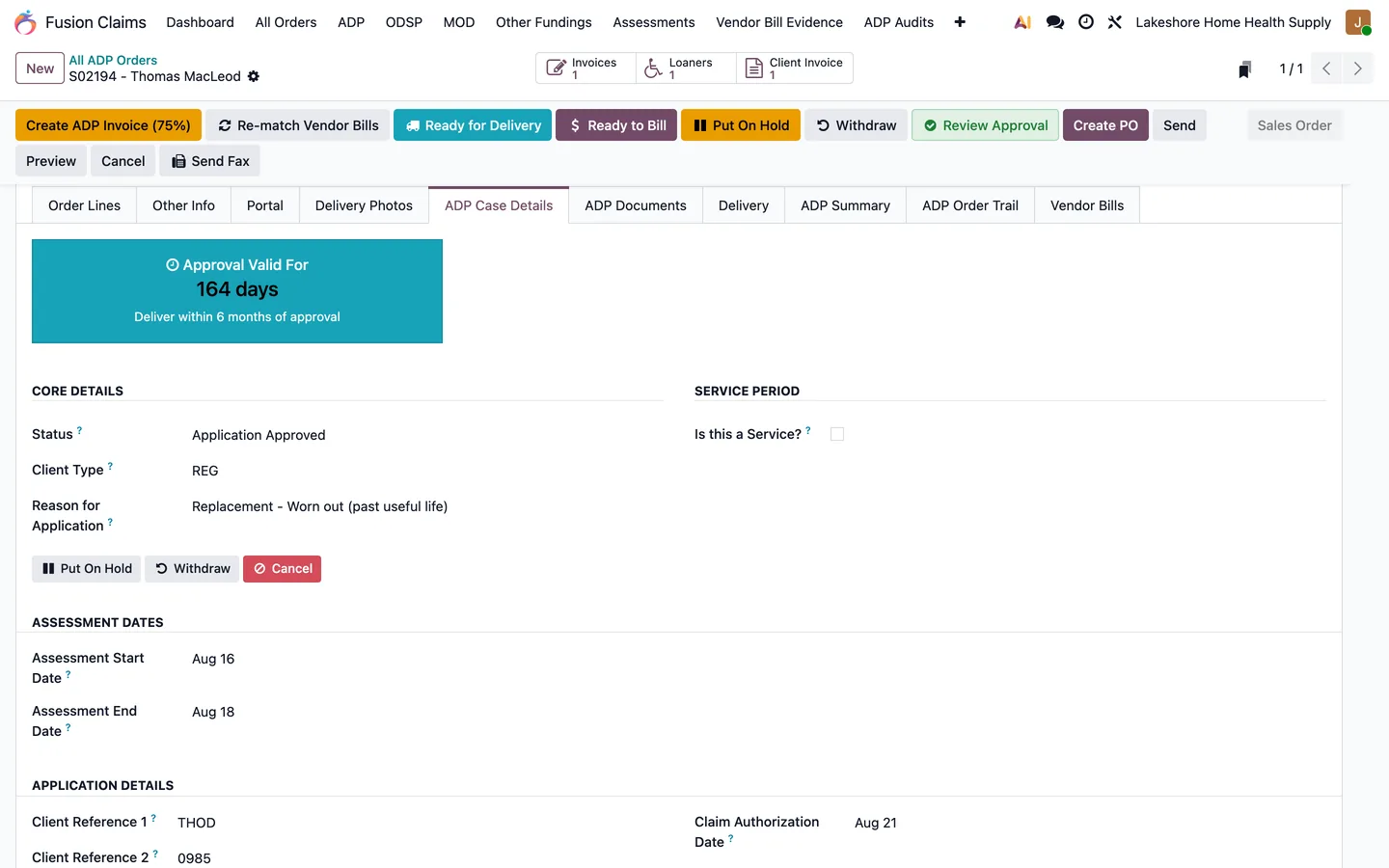
The approval countdown, client type, reason for application, and assessment dates on one tab.
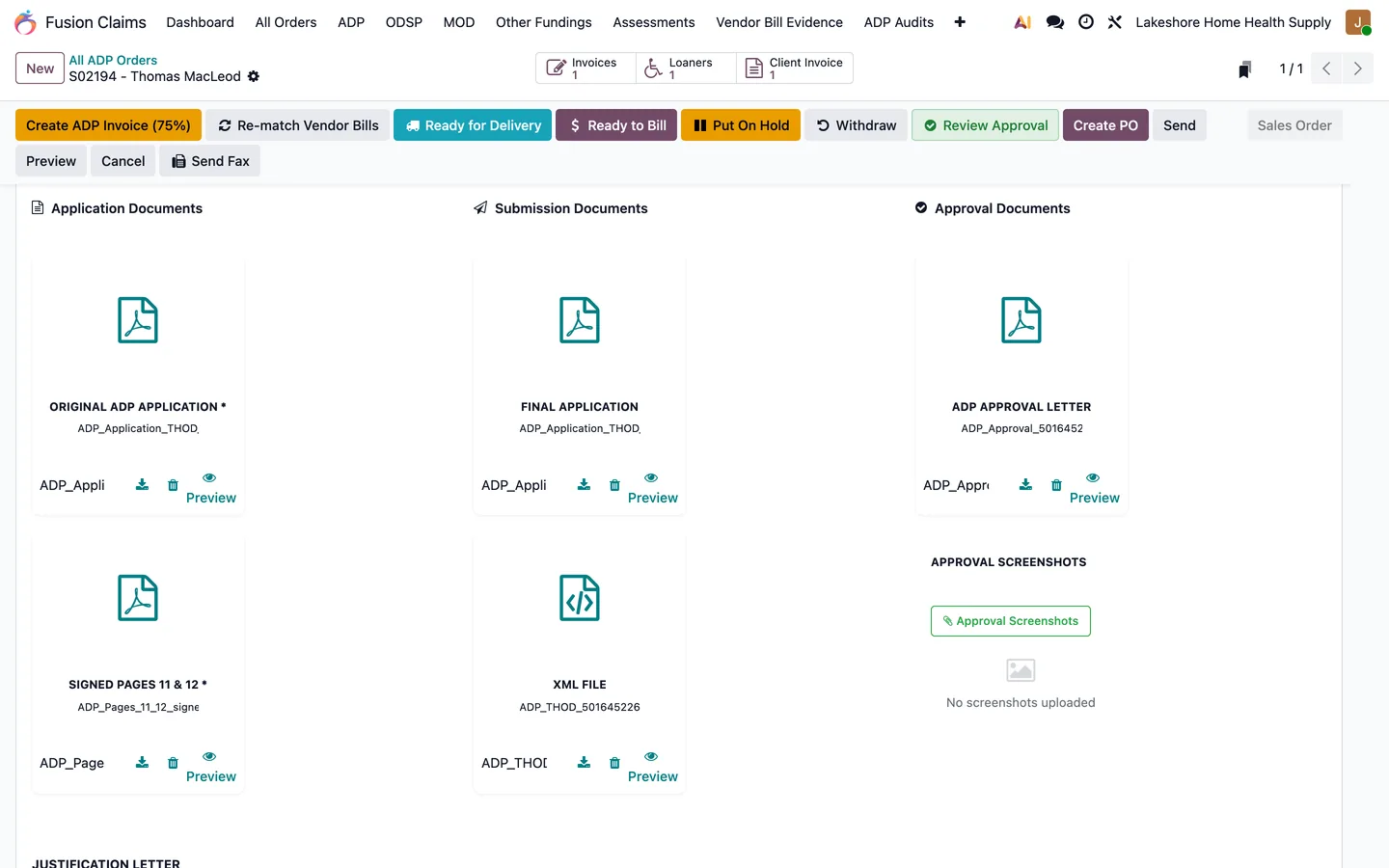
The application, signed pages 11 and 12, the XML file, and the approval letter, all on the order.
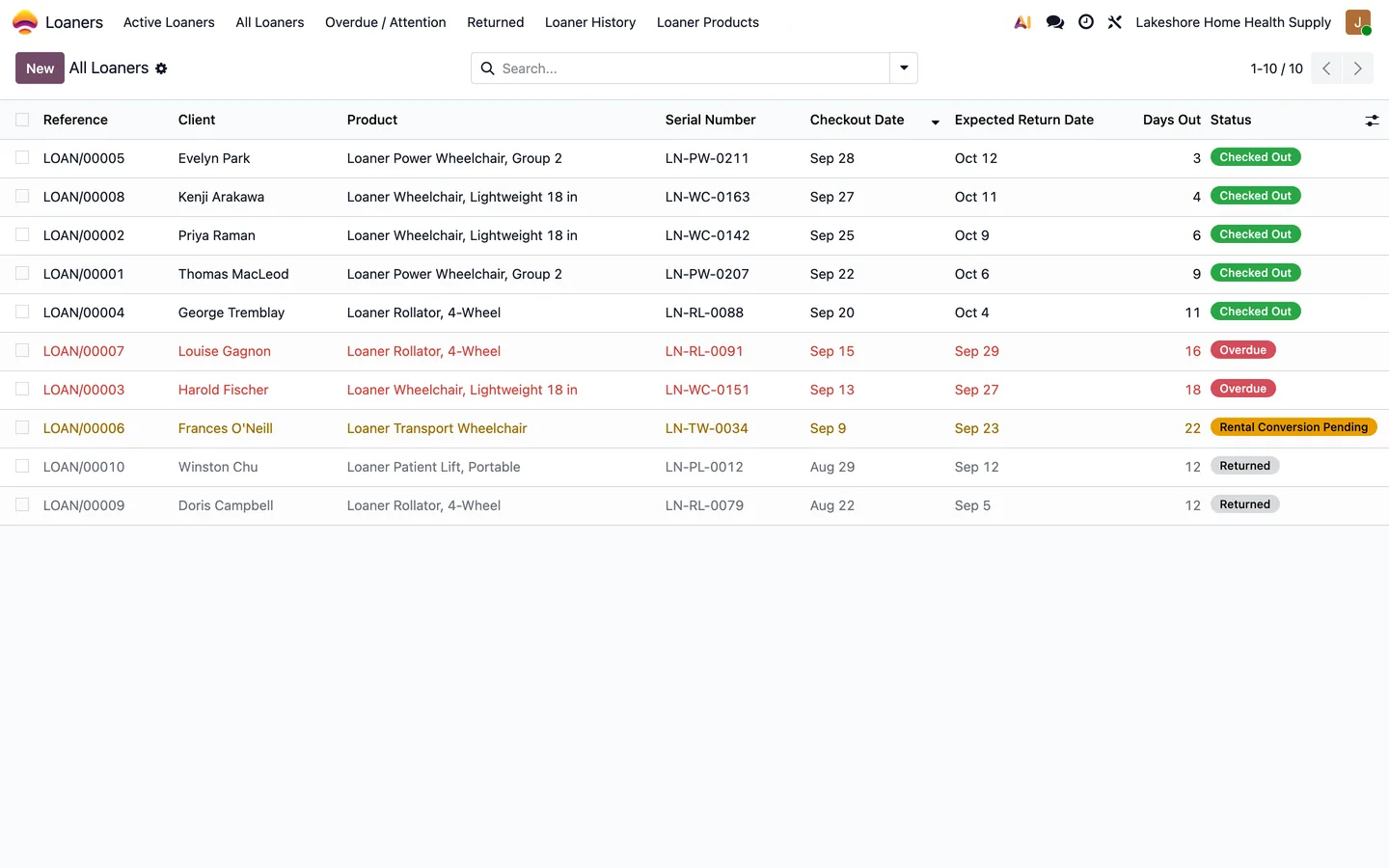
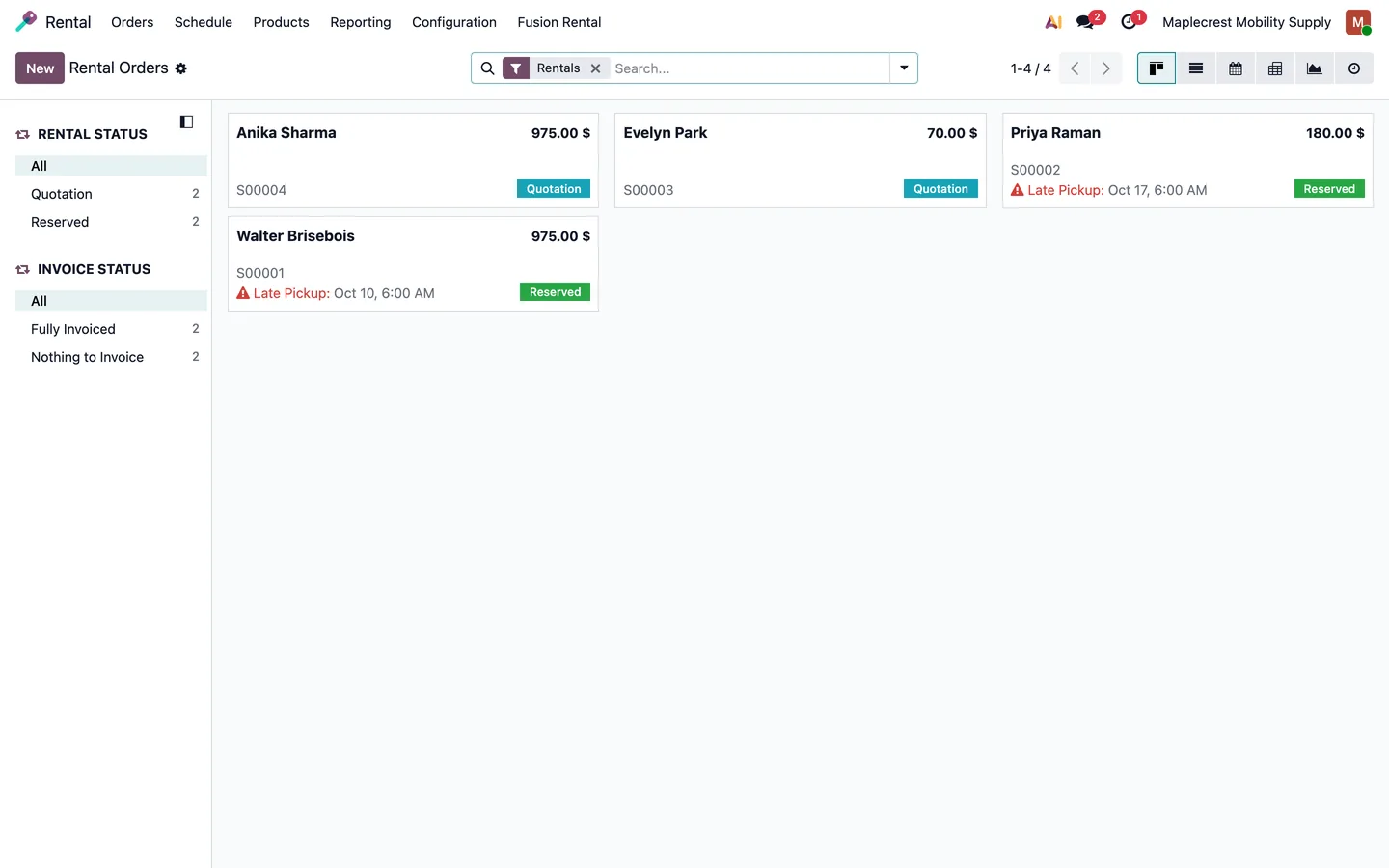
Loaner chairs and rollators with return dates, overdue flags, and rental conversions.
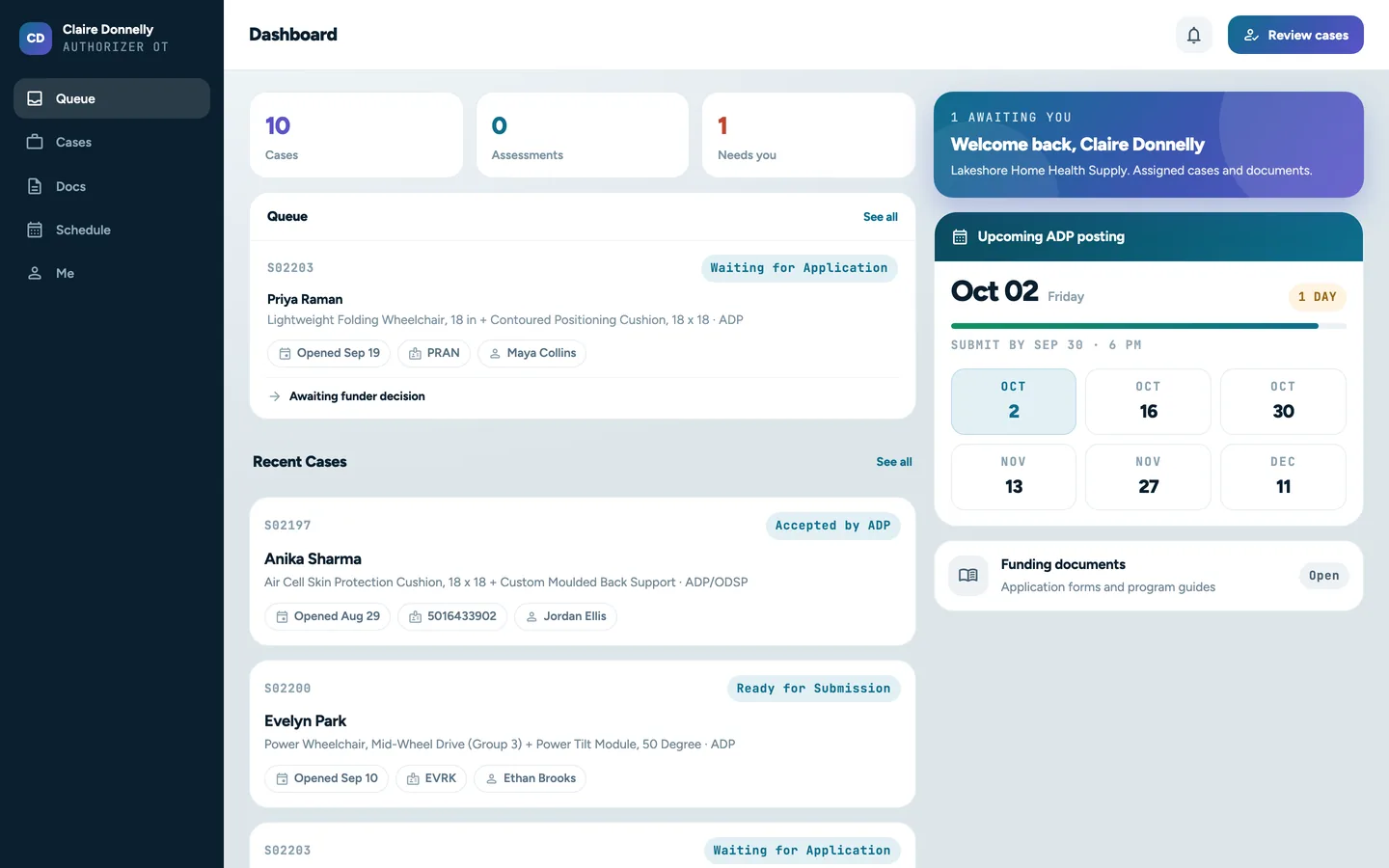
Occupational therapists see their queue and the next ADP posting deadline without calling the office.
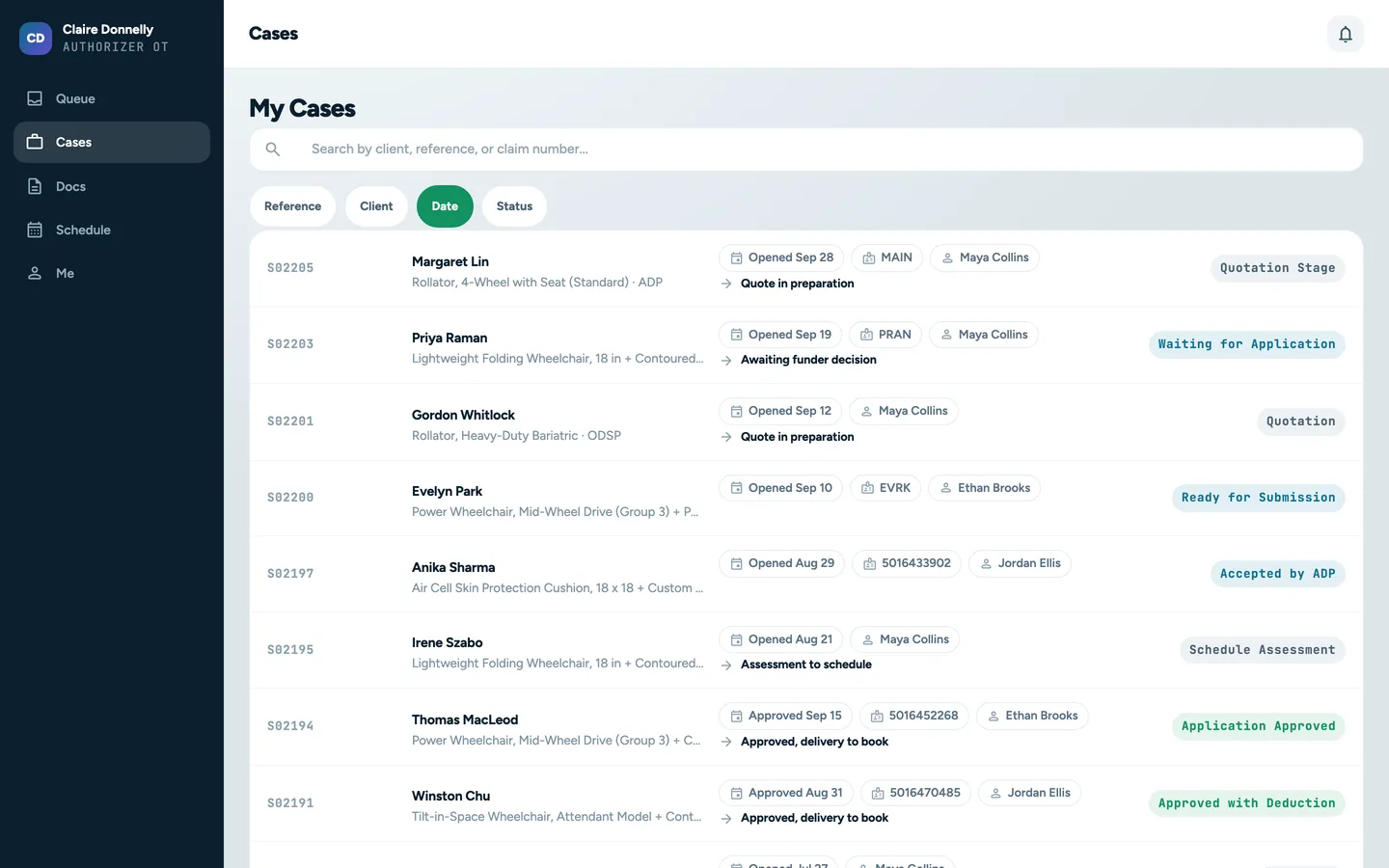
Every case with its devices, claim number, sales rep, and current status.
How it helps
Each module removes a specific headache.
We build on Odoo, then add our Fusion modules for the work generic ERPs leave out. Here is what each one does, shown on its own screen.
Fusion Claims
The ADP case, from quotation to closure
You cannot tell which claims are stuck, why, or whether the paperwork would survive an audit.
Tracks ADP claims from quotation through submission, approval, billing and closure.
Calculates ADP and client portions on sales and invoice lines, and creates separate client and ADP invoices.
Records which devices were approved before billing, with serial numbers, placement and authorizer details.
Ships with 1,895 ADP device codes and their ADP prices, and imports updates from JSON or CSV.
Exports the claim billing file in TXT format, parses ADP statements and builds evidence packs for ADP audits.
The LTC repair board: an emergency request from room 214 on top, each card with its room, serial and facility.
Fusion Loaners Management and Fusion Rental
Equipment that goes out and has to come back
Loaner chairs disappear while a client waits for funding, and rental renewals, deposits and returns live in a spreadsheet.
Tracks loaner checkout, return and location by serial number, with an audit trail and inventory transfers.
Identifies overdue equipment, sends reminder emails and converts overdue loaners into rentals.
Gives sales reps and authorizers portal access to loaner equipment.
Rentals: agreements signed online, separate invoices for rental charges and security deposits, automatic renewals with reminders and a cancellation link.
Returns collect condition notes and photos, then deposit deductions and refunds are processed after inspection.
Loaner chairs and rollators with return dates, overdue flags, and rental conversions.
Fusion Tasks and Fusion Meetings
Assessments, deliveries and technician visits
Delivery dates, technician routes and therapist appointments are juggled in separate calendars, and the proof of delivery comes back on paper weeks later.
Books assessments from the sales, technician and authorizer dashboards, with clash and drive-time checks, demo equipment and reminders.
Schedules technician visits, plans the day's travel and tracks visits through en route, in progress and completed.
Captures signed proof-of-delivery documents for completed work.
Lets technicians book follow-up visits and emails clients a delay notice with a revised arrival estimate.
Synchronises tasks and technician locations across configured instances.
Create PO groups the case lines by vendor and links the purchase order back to the case.
End to end
Follow one ADP claim through the system.
Nine stops from the therapist's call to the closed case. Pick a stop, or use the arrow keys, to see who acts, what the system does and the screen your team works in.
Stop 1 of 9
Book the assessment
Sales rep
Office
Therapist
What happens
The rep or office books the visit with the therapist, client, time, place and the demo equipment to bring. A therapist can also request an assessment from their own portal. The therapist gets an invitation and both get a reminder the evening before.
What it saves you
Clashes show before the booking is saved, and the equipment to bring is written on the meeting.
A sales rep books the assessment with the therapist, client, time, place and the equipment to bring.
Stop 2 of 9
Run the express assessment
Sales rep
What happens
The rep records the client, health card details, funding client type, reason for application and the equipment on the ADP Express form. Completing it creates or links the client and builds a draft order with ADP and client portions for the rep to review.
What it saves you
The quotation starts from the assessment instead of being retyped at the office.
The rep records the client, health card details and funding type on the ADP Express form.
Stop 3 of 9
Collect the application and signed pages
Therapist
Office
System
What happens
The therapist uploads the application to the case in their portal, and the office sees each revision. If it has not arrived, reminders are queued to the therapist 4 and 8 days after the assessment by default. The office then records how Pages 11 and 12 were provided.
What it saves you
No personal information sent as email attachments, and no application forgotten in a queue.
The office sees each uploaded revision, who uploaded it and which copy is current.
Stop 4 of 9
Check, then submit
Office
What happens
Ready for Submission checks the authorization date, client references, reason, previous-funding date, original application and signed pages. The submission step needs the final PDF and an .xml data file. Staff upload to the ADP portal themselves, then record the submission and ADP's response on the case.
What it saves you
Errors are caught in the office, before ADP sends the application back.
The submission step refuses a data file that does not have the .xml extension.
Stop 5 of 9
Record the approval
Office
System
What happens
Staff enter the claim number and confirm which devices were approved, with any deduction. Portions are recalculated, unapproved items become client funded, and the client and rep get an approval email with the Approved Items Report. Each therapist gets one summary of their decided cases.
What it saves you
No hand recalculation, and therapists get one email a week instead of one per case.
Staff confirm which devices ADP approved before the case moves on.
Stop 6 of 9
Order the equipment
Purchasing
What happens
Create PO groups the case lines by vendor, marks each purchase order for the client and links it back to the case. It works before or after approval, so long-lead items can be ordered early.
What it saves you
Every purchase traces to the client it was bought for, which the supplier-bill match relies on later.
Create PO groups the case lines by vendor and links the purchase order back to the case.
Stop 7 of 9
Deliver and keep the proof
Office
Technician
Client
What happens
The delivery is scheduled as a technician task. The proof of delivery lists the devices and serial numbers for the client to sign. Ready to Bill needs the approval, completed device verification, the delivery date and the signed proof of delivery as a PDF.
What it saves you
Billing cannot start on a delivery that has no proof on file.
The case moves to ready to bill once the delivery date and signed proof of delivery are on file.
Stop 8 of 9
Invoice and export the claim file
Billing
What happens
The client invoice carries only the client portion and the ADP invoice only the ADP portion. Funded lines are matched to supplier bills by serial, purchase-order link and other rules. Export ADP Claims builds the comma-separated .txt file, checks portions against the device prices, and saves every file with its posting period.
What it saves you
Two correct invoices from one case, and a retrievable record of every claim file you sent.
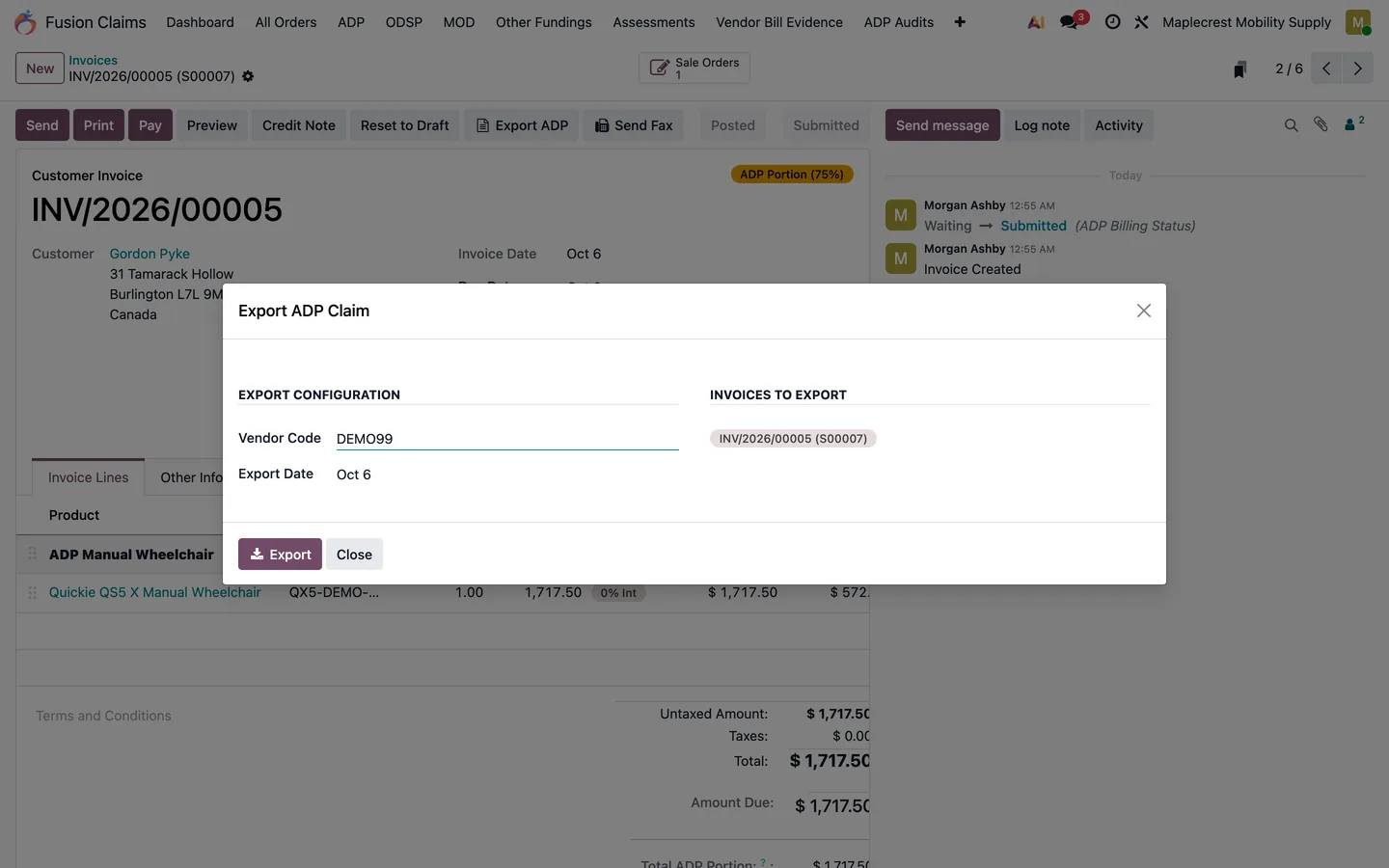
Export ADP Claims builds the submission file for the selected invoices.
Stop 9 of 9
Close the case, ready for the audit
Office
Claims manager
What happens
Before closing, the case is checked for signed pages, final application, proof of delivery and vendor bills. Closing anyway takes a written reason of at least 20 characters. If ADP requests an audit, the audit workbench matches the sample to cases and builds evidence packs.
What it saves you
Audit evidence is gathered as the work happens, not reconstructed months later.
Before closing, the case is checked for signed pages, final application, proof of delivery and vendor bills.
The .txt billing file for ADP, built and checked by the system.
Nobody types the billing file by hand. Billing staff select the posted ADP invoices, and Export ADP Claims writes the comma-separated file ADP expects, after checking every line.
1
Approved, delivered, invoiced
Only ADP invoice lines with a device code found in the device-code database are exported. Labour, delivery and non-funded codes are skipped.
2
Checked against the codes
Each line's portions are recalculated from the ADP price, the client type and any deduction. A mismatch stops the export with ADP Export Verification Failed.
3
One line per unit
A device with a quantity of two becomes two lines. Dates are written as ddmmyyyy, with no header row.
4
Saved for the record
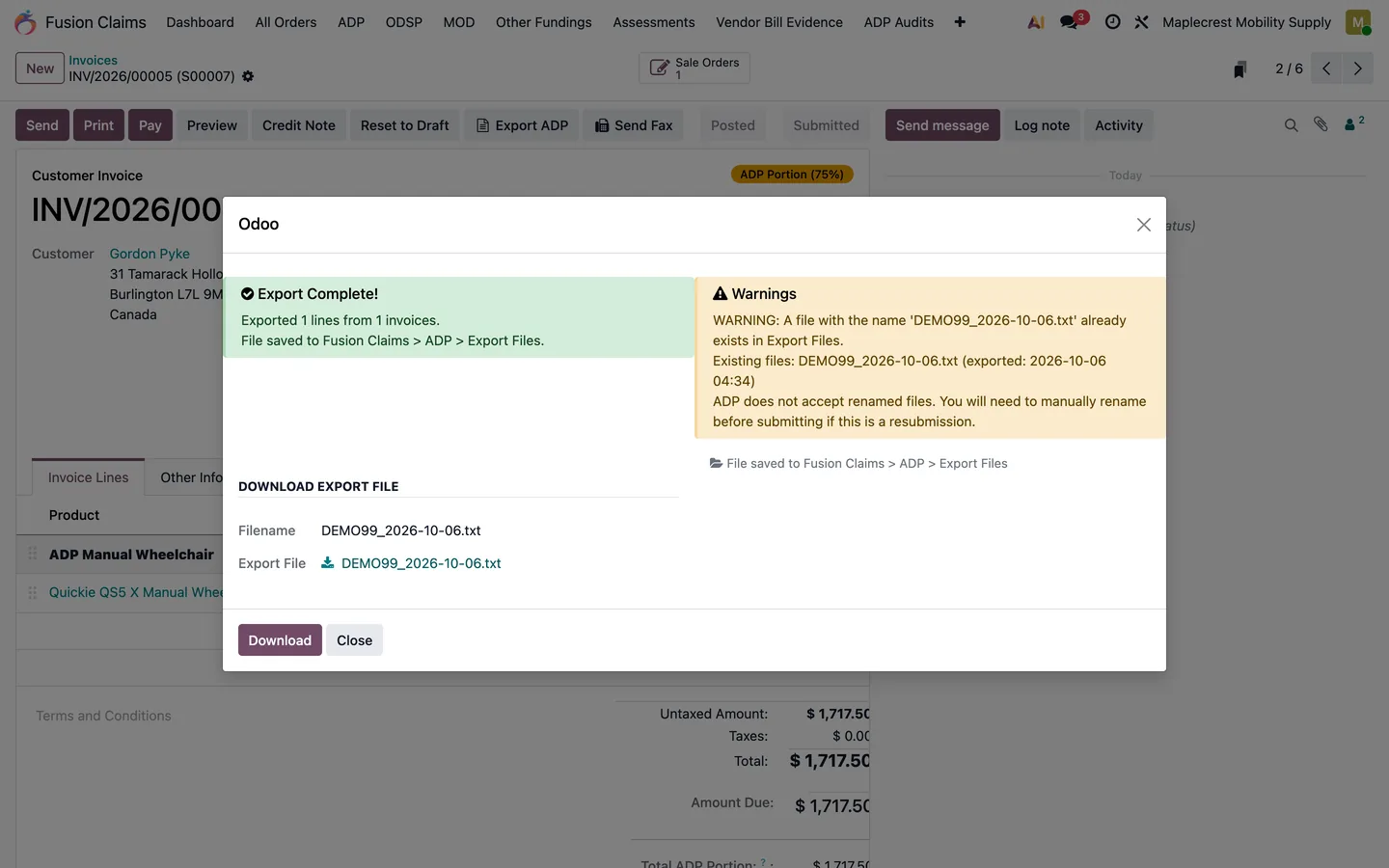
The file is named VENDORCODE_YYYY-MM-DD.txt and saved to Claim Submission Files with its posting period and line count. A repeated file name gets a warning, and each invoice is marked exported.
ExampleDEMO99_2026-10-15.txtInvented demo vendor, claims and serials
Field order follows the export code in Fusion Claims. Point at a field to find it in the file. The REG lines split 75% and 25% on the ADP price; the ODS line is 100% ADP. Your staff upload the file to the ADP portal themselves.
Built by Nexa SystemsSample data
1 / 3
Export ADP Claims builds the submission file for the selected invoices.
The export confirms the lines written, warns about a repeated file name and saves the file for download.
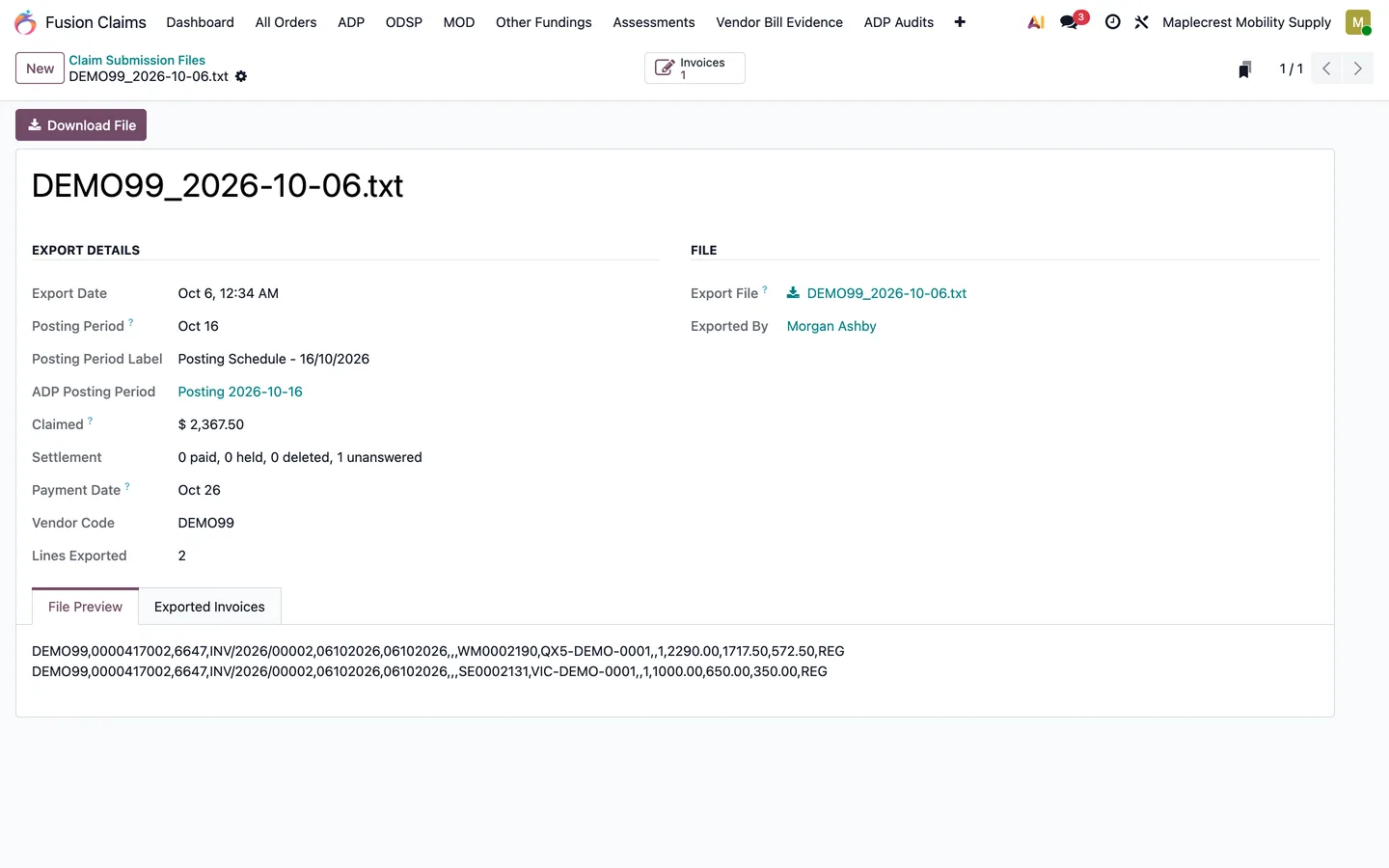
Every exported file is saved with its date, posting period, total and line count.
Still building the billing file by hand? Book a call and we'll show the export on a demo company.
Claims are only part of the day. Accounting, payroll, purchasing, stock, sales, repairs and maintenance run in the same Odoo system, on the same clients and products, so nothing is typed twice.
Accounting
Fusion Accounting
Post the client and ADP invoices, reconcile the bank and read the numbers in the same system as the claims.
An Ontario ADP vendor that sells, rents, delivers and repairs equipment, with its public website on Odoo carrying funding information and local service pages.
What made it hard
Every case touches the therapist, the rep, the office, purchasing, a technician and billing. When those hand-offs live in email and spreadsheets, the case stalls at whichever desk is busiest, and the evidence for an audit has to be rebuilt later.
How it runs now
ADP claims, funding splits, therapist approvals, equipment sales, rentals, deliveries, repairs and billing run through the ERP the whole team uses every day, built on Fusion Claims. Some workflows were built for Westin alone and are not sold as products.
Westin's sister company: a separate business with its own team, its own stock and its own ADP cases, working alongside Westin.
What made it hard
Two companies that share equipment and service work cannot run on one set of books, but re-entering the same stock and the same service visit in two places wastes time and invites mistakes.
How it runs now
Mobility runs the same ERP on its own system, every day. Inventory and service tasks sync between the two businesses, and both use one catalogue of standard service-call, labour, delivery and installation products.
Its own systemInventory syncService task syncShared service catalogue
Both stories describe how the businesses work, not results. Screens on this page come from a demo company with invented data; nothing here is taken from either client's system.
Examples
Situations an ADP vendor handles every week.
Illustrative examples of how the system behaves. The amounts are made up, not client results.
Example
A walker with a 25% client portion and an upgrade
A REG client is approved for a walker with an ADP price of $1,000.00 and wants a non-funded basket for $60.00.
The walker line splits $750.00 ADP and $250.00 client.
The basket has no ADP code, so all $60.00 goes to the client.
The client invoice is $310.00 and the ADP invoice $750.00, before tax.
Example
Approved with a deduction
ADP approves a wheelchair but reduces the funded amount on its cushion by $100.00.
Staff enter an Amount deduction of $100.00 on the cushion line while confirming the approval.
That $100.00 moves from the ADP portion to the client portion.
The case shows Approved with Deduction, and invoices already created can be updated.
Example
The device ADP did not approve
A power tilt module is quoted with the chair, but only the chair is approved.
Staff leave the tilt module unticked in the approval review.
The system makes it fully client funded and leaves it off the ADP invoice.
The approval email to the client attaches the Approved Items Report.
Example
The application that never came back
The assessment ended on a Monday and the therapist is busy.
By default a reminder is queued to the therapist 4 days after the assessment, copying the rep and office.
A second follow-up goes out at 8 days, and both are logged on the case.
The therapist uploads the application to the case in the portal.
Example
A loaner while funding is pending
A client needs a chair now, but the ADP approval will take weeks.
The rep checks out a loaner by serial number, creating a stock transfer.
After 5 days out the rep and office get a reminder; at 8 days the client gets one too.
If the client keeps it, staff convert the loaner into a rental.
Example
ADP asks for an audit
A list of sampled claims arrives months after billing.
Staff import the audit appendix into the audit workbench.
Each sampled claim is matched to its case, and any amount difference is flagged.
Invoice, supplier bill, proof of delivery and payment evidence are gathered into evidence packs.
Try it
How one funded line splits
This follows the rules the system uses on an approved ADP device with a quantity of one: REG clients split 75% ADP and 25% client on the ADP price, other client types are 100% ADP, a Percentage deduction is the share of the ADP portion still paid, and an Amount deduction is taken off the ADP portion.
ADP invoice$750.00
Client invoice$310.00
Device, ADP portion $750.00
Device, client portion $250.00
Non-funded extras, client $60.00
An illustration of the system's calculation before tax, not funding advice. ADP decides what it funds; your configuration and the approval on file decide what the system bills.
Getting started
The modules come with an implementation.
There is nothing to download and install on your own. We set the system up around your business, then stay on to support it.
A first call
You walk us through your claims, sales, service, inventory and billing as they run today.
Map the workflow
We find the billing and document bottlenecks and choose the Fusion modules you need.
Scope and quote
A written scope and quote for your departments, products, payers and reporting.
Configure
Odoo and the modules configured around how your team works, with your data brought across.
Go live
Your team starts working in the system, and we support it from there.
This is a strong fit if you:
Sell and service mobility equipment, seating, wheelchairs, rentals, repairs or home accessibility products.
Work with ADP plus at least one other payer such as ODSP, March of Dimes, WSIB, insurance or private pay.
Serve long-term care homes, or lend equipment while funding is pending.
Have billing delays because approvals, documents, delivery proof and invoices are not connected.
This is not the right fit if you:
Only need a basic website, brochure or simple accounting setup.
Do not want to standardize your workflow or change how staff move cases through the business.
Want a generic Odoo install with no ADP-specific configuration.
Want to buy modules and install them yourself.
Program references: Ontario's Assistive Devices Program explains ADP funding models, registered vendor billing and eligibility. Official details remain with the Government of Ontario:
Assistive Devices Program
and
authorizer/vendor registration.
FAQ
Common buying questions
Clear answers before you book a call.
Is this used by real ADP vendors today?
Yes. Westin Healthcare and its sister company, Mobility Specialties in Etobicoke, both run this ERP every day. Each has its own system built on our Fusion Claims module, and inventory and service tasks sync between the two businesses.
Which funding programs does it handle besides ADP?
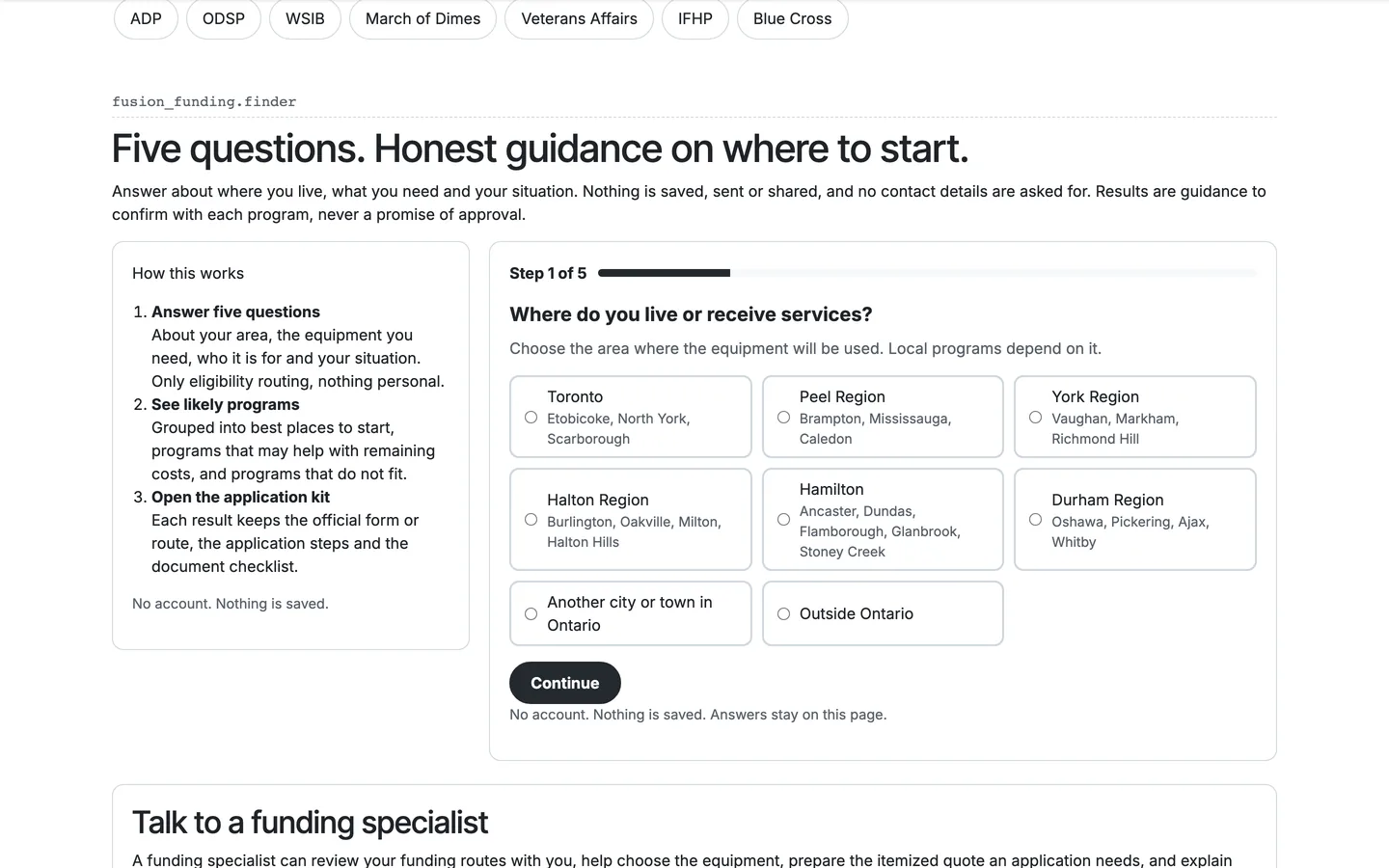
Each case carries a sale type: ADP, ADP/ODSP, ODSP, WSIB, Direct/Private, Insurance, March of Dimes, Muscular Dystrophy, Others, Rentals or Hardship Funding. ODSP has its own Standard, SA Mobility and Ontario Works flows, March of Dimes has its own case flow and split invoices, and ACSD clients run inside the ADP workflow as client type ACS. See the funding programs.
Does it submit claims to the ADP portal for us?
No. Your staff still upload the application and the claim file to the government portal. The system checks the files before submission, records the submission and ADP's response, and builds and keeps the .txt claim file for each billing run.
Does it build the ADP billing file?
Yes. Export ADP Claims writes the comma-separated .txt file from the posted ADP invoices, one line per unit, after rechecking each line's portions against the device-code prices. A mismatch stops the export. Each file is named VENDORCODE_YYYY-MM-DD.txt and saved in Claim Submission Files.
Do therapists and sales reps need full Odoo licences?
No. They sign in to the portal, which shows a therapist only the cases assigned to them and gives sales reps their own cases, assessments and bookings, without your internal ERP screens.
Can long-term care homes send us repair requests?
Yes. Fusion LTC Management gives facility staff a repair request form, optionally password protected, that asks for the resident, room, serial number, issue and before photos. Requests land on a repair board, and recurring equipment cleanups create technician tasks.
Can this replace QuickBooks and spreadsheets?
For day-to-day operations, yes. The goal is to move claims, sales, service, inventory, billing and reporting into Odoo. Accounting can run in Odoo with Fusion Accounting, or stay in QuickBooks Online with two-way sync.
Can we buy the modules and install them ourselves?
No. The modules come with an implementation. We map how your business runs, configure Odoo and the modules around it, move your data and train your team.
How does a project start?
With a call. We map your current workflow, find the billing and document bottlenecks, and choose the Fusion modules you need. Then we scope and quote the work and configure Odoo around your departments, products, payers and reporting.
Make the software match how your ADP business runs.
Book a call and walk us through your claims, sales, service, inventory and billing. We'll show the system on a demo company and scope the work for your business. Prefer the phone? Call 905-792-0000.